TOKKI TALK FOR MINECRAFT
Quizzes
Press Y to open a quiz. Press 1 to 4 to answer. Quizzes only show up when you're safe.
Answer a quiz
When a quiz is ready, a small Tokki quiz badge shows up in the corner.
- Press Y to open it.
- Press 1, 2, 3 or 4 to pick an answer. These are your hotbar keys, but your slot doesn't change.
- Busy? Press Backspace to answer later.
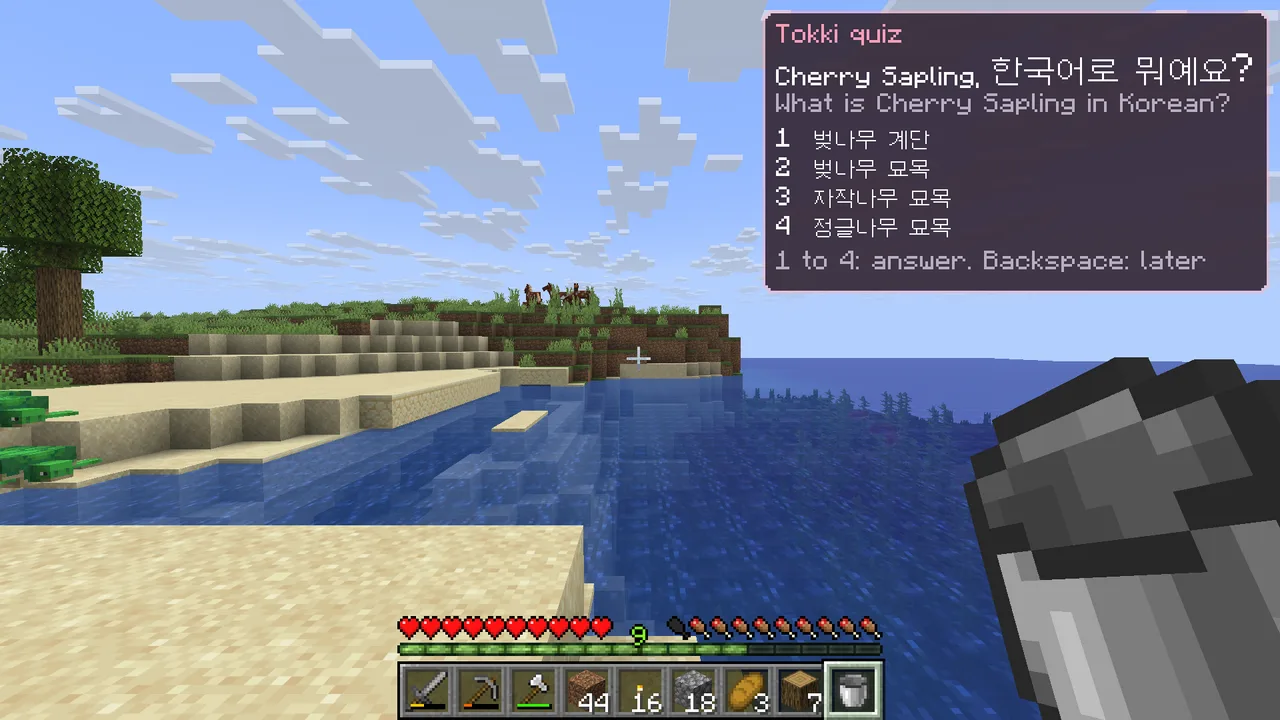
A name quiz. Press 1 to 4 to answer, or Backspace to answer later.
Get it right and you see 맞아요! (that's right). Get it wrong and you see the answer. If you're signed in, Tokki also says the answer out loud.
Each answer helps Tokki choose when to ask you that word again. Not signed in? Your answers wait on your computer and sync later.
Answer with your voice
- Open a quiz.
- Hold Z and say the answer or its number.
- Let go.
Want a challenge? Hold Z as the quiz opens. The choices stay hidden until you say the answer.
The number keys always work too. Answering by voice needs you to sign in and a microphone.
Kinds of quiz
- Action quizzes ask what you just did.
- Name quizzes ask for a Korean name.
- Listening quizzes play a word, and you pick it. Press C to hear it again. These need you to sign in.
- Counting quizzes ask how many you made, or which counting word fits.
You can turn each kind on or off on the Practice tab.
When quizzes show up
Quizzes wait until you stand still for a moment with no monster nearby. They never show up while you're hurt or falling. At first, that means 4 seconds standing still and no monster within 16 blocks. A quiz can come every 3 minutes, up to 20 a day. You can change all of these in the settings.